Insights
How much TellMore AI is doing, how much you still do by hand, and when your customers actually write to you.
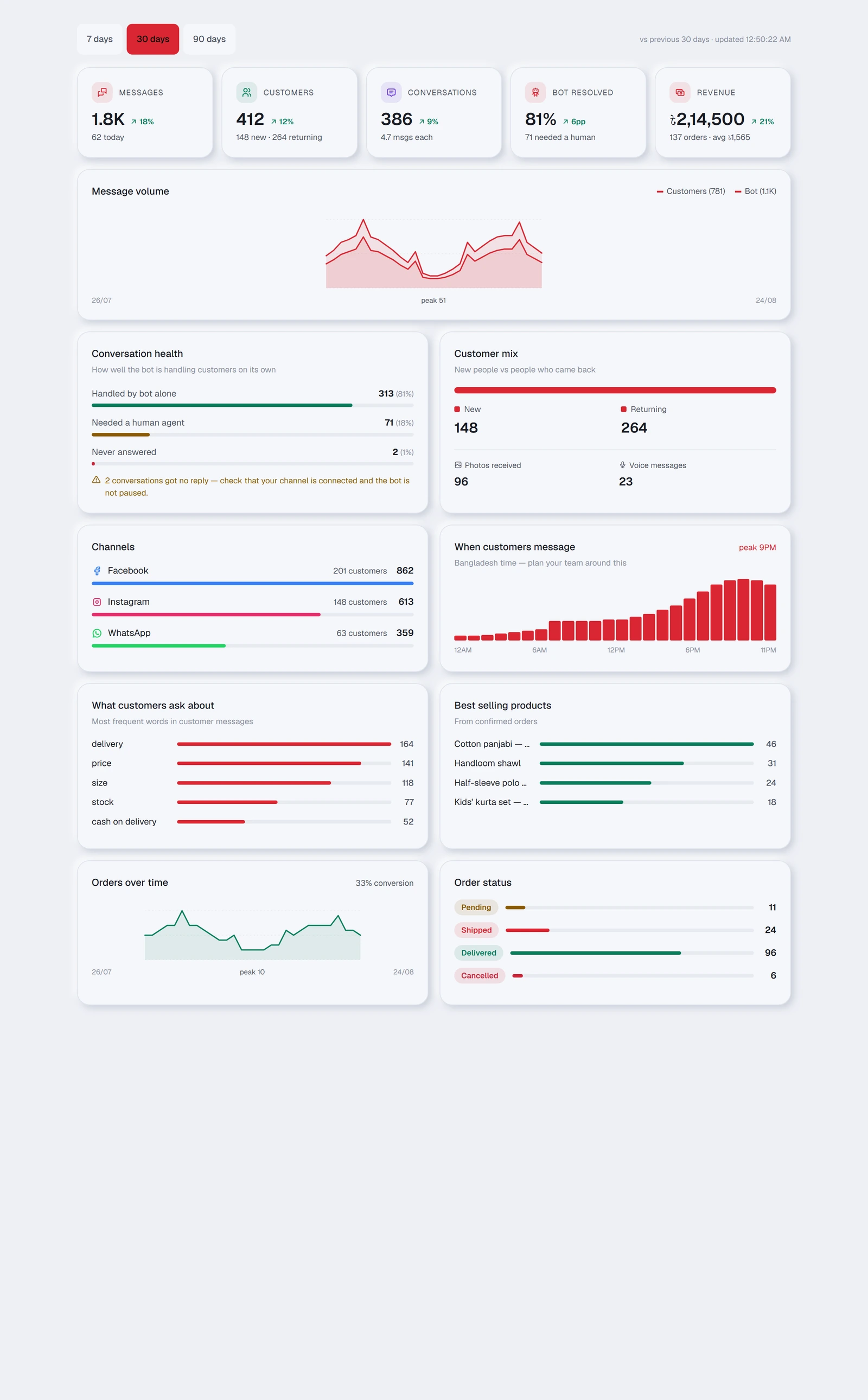
The five cards at the top
| Card | What it counts |
|---|---|
| Messages | Every message in and out, with today's figure underneath |
| Customers | How many different people wrote to you, split into new and returning |
| Conversations | How many separate chats, and the average number of messages in each |
| TellMore AI resolved | The share of chats TellMore AI finished on its own, with how many needed you |
| Revenue | Money from every order except cancelled and returned ones, with the order count and average order value |
| Card | What it counts |
|---|---|
| Bookings | Confirmed bookings, and what share of your customers that is |
Leads
Under the message volume, the Leads card counts the period: New chats (customers who wrote for the first time), Interested, not bought, Bought and Said no — with the share of leads that bought (for a service: *Interested, not booked* and *Booked*). A lead is a customer who showed interest. TellMore AI marks them by itself from the chat (see the Inbox page, "Where a customer stands"); your team's choice always wins, and the card says how many of the changes TellMore AI made.
Open in Inbox under a number opens the Inbox on exactly those chats — the quickest way to follow up everyone who asked and did not buy.
On a package without the AI (Shop Inbox, Service Inbox) the card counts what your team marked, and a recorded sale counts as Bought.
Where customers come from
Under the Leads card, this card lists everything that brought customers to your inbox in the period, each with its picture: every Click-to-Messenger, Instagram or WhatsApp ad, every post someone commented on and TellMore AI answered in the inbox, Instagram story replies, and your tracked links. For each: the chats it started, how many of them became leads, the orders (or bookings) those customers made and, for a shop, the money, with the rate of chats that became a sale. Cancelled and returned orders do not count as sales.
View opens the ad or post on Facebook. Open these chats opens the Inbox on exactly the customers it brought.
Make a tracked link: give a name to a place you will share a link (a Facebook group, a flyer, an influencer), copy the link, and share it there. Everyone who writes to your Page through it is counted here under that name. Tracked links are for Facebook Pages.
The same is shown where you work: the customer panel in the inbox has a Came from card with the ad or post, its picture and a link to it (and where they first came from, if that was different); the inbox filter Every source shows only customers from ads, posts, stories or links; and an order says which ad or post brought it.
Posts, story replies and tracked links count from 27 October 2026.
Each ad shows its Ad ID. Paste it into the search box in Meta Ads Manager to find exactly that ad.
It counts from 10 October 2026, when the platform began keeping which ad a customer came from. For Facebook and Instagram, Meta only sends the ad when your Page is subscribed to referrals — new Pages are; for a Page connected earlier, ask us to switch it on.
Leads from lead forms
A lead form ad (Meta calls it an Instant Form) lets someone leave their name and phone inside Facebook or Instagram without writing to you, so they never reach the inbox. This card lists them: name, phone (with Call and WhatsApp buttons), email, every answer they gave, the ad that brought them with its Ad ID, and the form.
Mark each one New, Contacted, Bought (for a service: Booked) or Not interested as you follow up. You get a notification when a new lead arrives.
Meta shares lead forms only with an app it has allowed to read them (the leads_retrieval permission). Until it is allowed for your Page, a new lead shows as waiting, with its ad, and is read as soon as it is allowed. Meta keeps a lead for 90 days.
Conversation health
Three bars that answer one question: is TellMore AI actually coping?
| Bar | What it means |
|---|---|
| Handled by TellMore AI alone | TellMore AI answered and nobody needed you. This is the one to grow |
| Needed a human agent | You took over. Normal — but a rising share is worth investigating |
| Never answered | Somebody wrote and got nothing back |
Customer mix
New people against people who came back, plus a count of the photos and voice messages customers sent. If those two numbers are high, your customers prefer showing to typing — worth knowing before you write TellMore AI's training.
Channels
Which platform is actually carrying your business, by message count and by how many separate customers came through it. Useful when deciding where to spend on advertising.
When customers message
A grid of seven rows (Sunday to Saturday) by twenty-four hours, in Bangladesh time: the darker a cell, the more customers wrote then, and the busiest hour is outlined. Friday evening and Monday morning stop being averaged into one number.
Above it, Message volume is one bar per day — the whole bar is every message that day, the filled part is what TellMore AI answered.
This is the most practical chart on the page: it tells you the hours worth being personally available, and the hours you can safely leave to TellMore AI.
What customers ask about
The words that come up most often in customer messages. Read it as a to-do list for Train TellMore AI — a word appearing often that TellMore AI handles badly is the single most valuable thing you can fix.
Best selling products
Taken from confirmed orders only, so it reflects what people actually bought rather than what they asked about. Underneath, Orders over time and the conversion figure show what share of the people who wrote to you ended up ordering.
Most requested services
Taken from confirmed bookings only. Underneath, Bookings over time and the conversion figure show what share of the people who wrote to you ended up booking.